
Group Related Discussion Points
AI can group related points from your meeting notes or an existing transcript into sections by topic, making a scattered discussion easier to follow.
Paste your meeting notes or an existing transcript to create editable minutes with key discussion points, decisions, and action items. Start free, without an account.
Meeting Minutes Example
A structured draft brings meeting details, discussion summaries, decisions, and action items together in one document. Owners and due dates can be included when they are provided in your notes.
Example decision: Approve the revised project schedule. Example action: [Owner] to share the updated schedule by [date].
Generate Meeting Minutes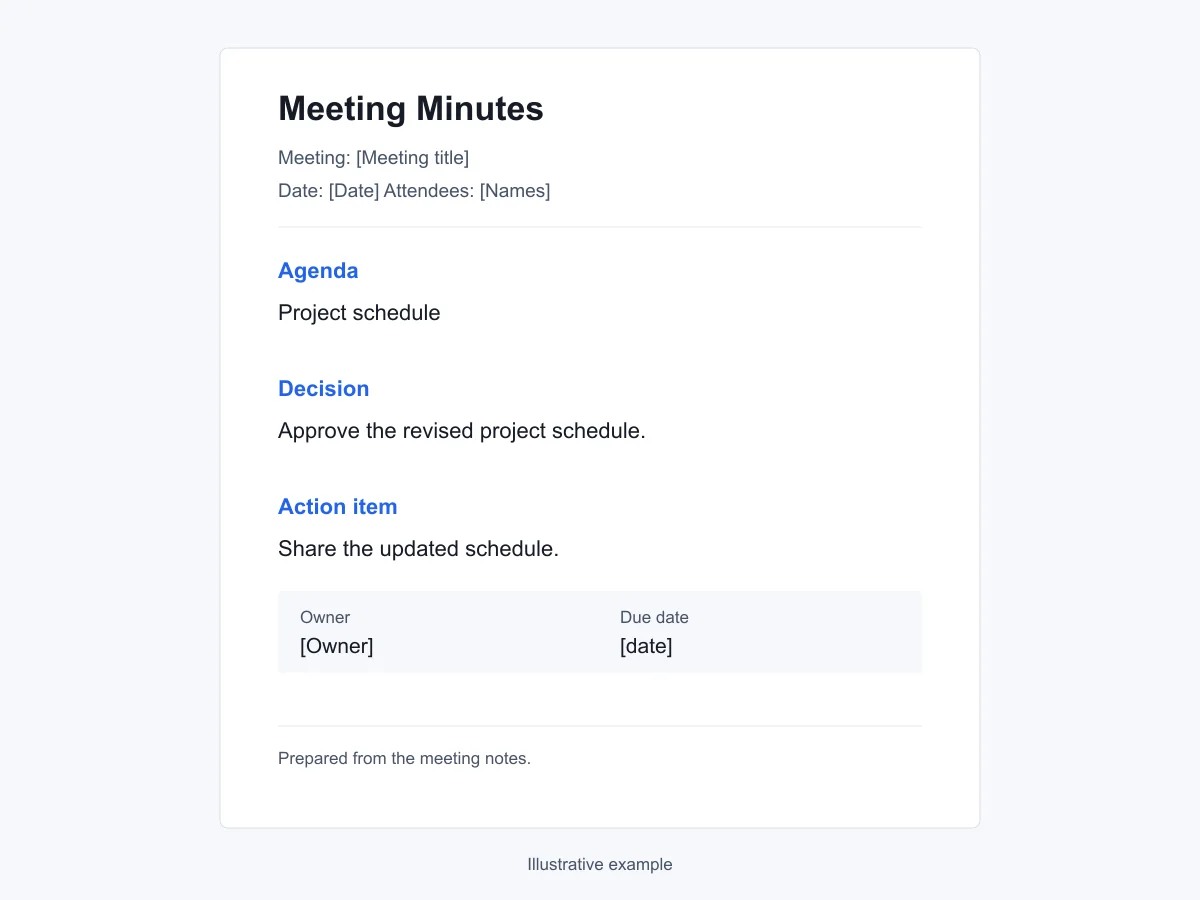
Tools for Writing Meeting Minutes
Use the AI meeting minutes generator to organize your source notes and tailor the draft to the people who will read it.
AI can group related points from your meeting notes or an existing transcript into sections by topic, making a scattered discussion easier to follow.
The draft can follow the level of detail and tone specified in your request, from a brief team recap to a fuller record for review.
Correct names or wording directly, or request an AI revision to shorten a discussion summary or clarify an action item.
After the conversation ends
Scattered or incomplete notes can leave people unsure what was agreed, who should act, and why a decision was made.
Points about the same issue appear in different parts of the notes or transcript. Readers have to piece them together to understand the outcome.
Someone suggests a new approach, but the notes do not say whether the group agreed. That ambiguity can turn an idea into an assumed commitment.
The notes list agreed tasks without clear owners or due dates, leaving the team unsure who should act and when.
The recap lists a decision but leaves out the reasons or constraints discussed. Readers who missed the meeting may need to ask for that context before they can follow up.
From your notes to a meeting record
Use your existing meeting notes or transcript to prepare a draft, then review it before downloading.
Paste your meeting notes or an existing transcript into the text box. Add the meeting title, date, and attendees where known, and flag any uncertain details.
Add instructions for the sections and level of detail, such as brief discussion summaries followed by decisions and action items. Generate the draft, answering any follow-up questions if prompted.
Check decisions, action owners, and due dates against your notes, and confirm missing details with the team. Edit the text or request an AI revision, then wait for your changes to save before choosing an available download format.
For people responsible for the record
Prepare meeting minutes for team follow-up, project coordination, client communication, or review by the meeting chair.
Turn a recurring team discussion into a record of priorities, blockers, and agreed follow-up that colleagues can check before the next meeting.
Generate Meeting MinutesRecord decisions and dependencies from cross-functional meetings so each team can see what it must complete before another team can proceed.
Generate Meeting MinutesPrepare an editable draft for the meeting chair to review, with recorded decisions and any details still awaiting confirmation.
Generate Meeting MinutesDocument what was agreed in a client conversation, while separating requests that still need an estimate or internal approval.
Generate Meeting MinutesA practical starting point
Use AI for the initial drafting work while keeping the review and approval of the minutes in your team's usual process.
Try the free AI meeting minutes generator without creating an account. Generation and AI revisions share a usage allowance.
Prepare minutes after the meeting using notes or an existing transcript. No meeting bot is required.
AI provides an initial structure and wording from your source text, giving you a draft to check and refine.
Draft and edit your minutes in a web browser without installing a separate meeting application.
Fix a misspelled name or adjust a sentence directly, without using another AI request for each small change.
A Word download gives you an editable file to circulate through your usual review process.
Meeting Scenarios
Add one of these sample requests to your meeting notes or transcript, then adjust it to match the details you have.
Create weekly team meeting minutes from these notes, organizing updates by topic and listing blockers and agreed follow-up. Include any recorded owners and due dates.
Draft minutes for this project kickoff, covering the agreed scope, milestones, dependencies, and unresolved questions.
Turn these retrospective notes into minutes covering what worked, what needs improvement, and changes agreed for the next sprint.
Prepare client project meeting minutes that separate feedback on current deliverables from new requests. Distinguish confirmed commitments from items awaiting an estimate or approval.
Draft board meeting minutes by agenda item using the motions, votes, and decisions recorded in my notes. Mark missing details for the secretary to confirm.
Create minutes from this HR policy discussion, separating the policy changes considered, decisions made, and follow-up assigned to HR.
Write minutes for the sales handoff to the delivery team, recording customer requirements, commitments made during the sales process, and questions still needing an answer.
Prepare minutes for this committee or club meeting, including event plans, agreed spending, and volunteer responsibilities. Add the next meeting date if it was agreed.
Create incident review minutes covering the timeline, confirmed findings, and agreed corrective actions. Keep possible causes separate from confirmed causes.
Before you begin
Check the input, editing, and download details before you prepare your first draft.
Need a policy detail? Read the Privacy Policy or Terms of Use.
You can start free without creating an account. Generation and AI revisions share a usage allowance with other tools on this site. Direct text edits and downloads do not use AI requests.
Paste your meeting notes or an existing transcript into the text box. Add the meeting title, date, attendees, and any confirmed decisions you have. Generating minutes from uploaded files is not currently available.
No. It creates minutes from text you provide. For a recording, transcribe it with another tool first, then paste the transcript here.
A summary focuses on the main points of a conversation. Meeting minutes usually provide a structured record of the meeting details, decisions, and agreed follow-up.
Ask AI to include owners and due dates that appear in your notes. If they are missing, confirm them with the team before filling them in. A written action item does not create a task or send a reminder.
Edit the text directly, or give AI a specific instruction such as shortening the discussion while keeping the decisions. AI revisions count toward the same allowance as generation.
A draft created without a template downloads as Word (.docx). With a template, the Download menu shows the available formats, which may include Word, PDF, or both. Wait for your edits to finish saving before downloading.
You can prepare a draft from the meeting record you supply. Include the motions, votes, and approvals that were actually recorded, then have the responsible person check the draft against your organization's requirements.
The input box accepts up to 10,000 characters in total, including your instructions. For a longer transcript, prepare a shorter version that preserves the discussion context, decisions, and action details before pasting it.
Check names, dates, decisions, vote details, and action owners against the original record. Confirm that proposals and open questions have not become agreed actions, and replace any remaining placeholders. Circulate the draft through your usual approval process.
Paste your meeting notes or an existing transcript to start a free draft. No account needed.